Self Improvement Learning
A mobile platform combining a Go2 EDU Plus robot dog, a D1 arm, and front and wrist cameras. The robot carries its own computer; the shared workstation connects over the lab network.
Goal: identify the delivered equipment, mount and connect the arm and cameras, and arrange separate readiness checks for the dog and the arm.
What you need
Core equipment: Go2 EDU Plus with battery, charger, and controller · D1 arm with mounting kit · protective gantry · D435i front camera in a printed head bracket · D435 wrist camera with clamp mount.
Open items: wrist-camera USB host and cable route, gantry clearance with the arm mounted, calibration target. Details
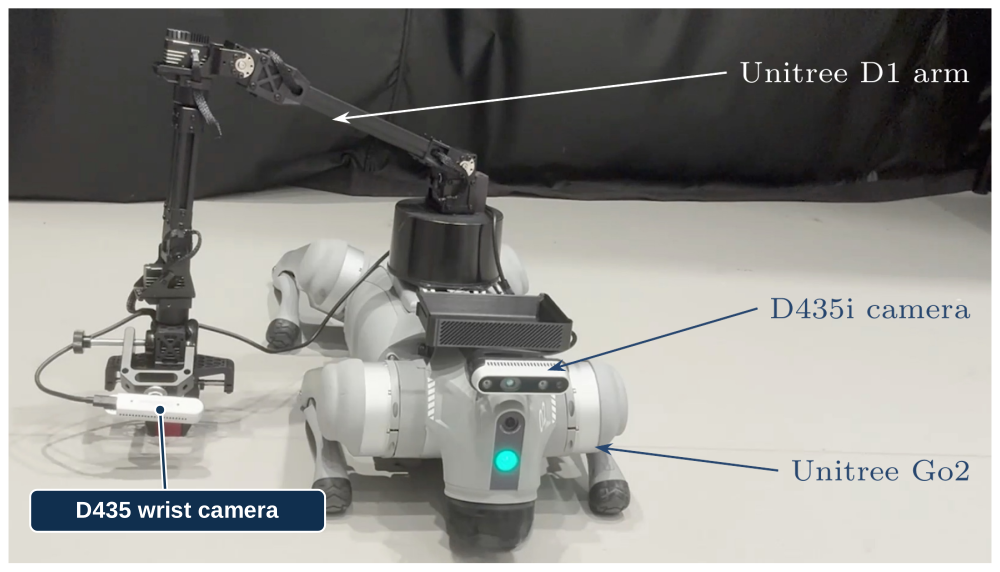
Unitree Go2 · Unitree D1 arm on the expansion dock · D435i in a printed bracket on the head · D435 wrist camera clamped beside the gripper. The gantry is not shown.
Set up the platform
| Step | Guide | Ready when |
|---|---|---|
| 1 | Equipment and connections | Robot, battery, controller, cameras, and arm equipment are accounted for and connected |
| 2 | Mount and check the D1 arm | The arm and wrist camera are secured and their cable routing is checked |
| 3 | Basic software | Vendor tools and device connections are checked |
| 4 | Hardware readiness | An operator has checked the complete platform |
A ready dog does not make the arm ready: complete the D1 checks separately.